So, you think you can prompt?
We've all been there. You write a quick prompt and your ever-trusted buddy, your favorite large language model, goes totally off the rails. It gives some ridiculous answer and a feeling of dread comes over you... sigh… I could have done this faster myself.
No matter what people say, the quality of your prompt is still directly related to the quality of your AI's response. Actually, it is no different than with humans; if I'm very vague about the assignment I'm giving you, I might get a very ambiguous result. The clearer I am and the clearer I define what I expect, the better the outcome will be.
LLMs do not know what the "truth" is; they produce text that is statistically likely, not factually verified. When they output incorrect or fabricated details while still sounding plausible, we call these hallucinations.
Hallucinations will remain an issue, but writing a strong prompt can reduce them.
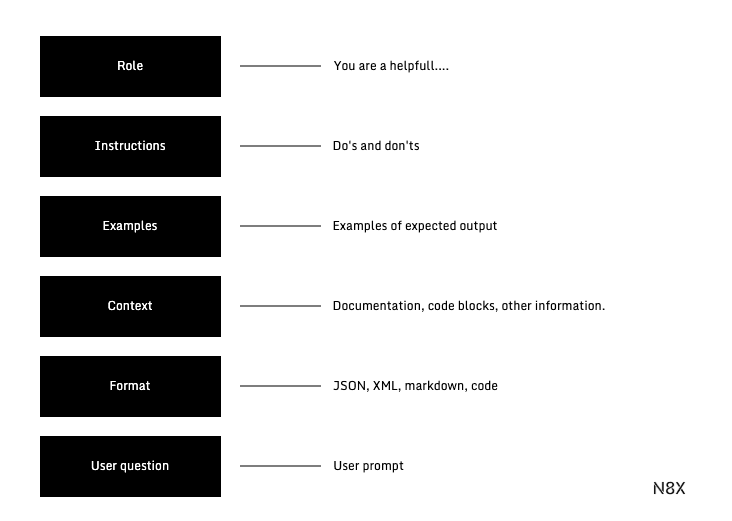
My intention with this writing is to give you a systematic framework for writing effective prompts, so you can go from zero to hero.
System prompt and user prompt
The first thing you will want to know is the difference between a user prompt and a system prompt. If you are interacting with an AI application, there is a good chance that a (hopefully) clever developer wrote a system prompt for this application.
In a system prompt, we are usually grounding the large language model into how to respond to the user interacting with the application. The system prompt is hidden from the end user but guides the model's behavior and how to respond. This prompt basically shapes the interaction that the user has with the application. Needless to say, writing an effective system prompt is important. Applications like ChatGPT and Claude are known for having system prompts that can be several pages long.
When we talk about prompting, most of the guidance in this article will help you write an effective system prompt, but it will also help you as a user interacting with an AI application to prompt a model in a better way. So any time you interact with Gemini or Claude, you'll be squeezing the most juice out of the model.
Like this piece? Join the newsletter
Define the persona
Large language models respond to the context you provide them, so it can help to define a role or persona for the model to help it get into the context of the task you want it to perform.
An actionable tip here is to start your prompt off with letting the model roleplay. If you want the model to help you write an effective tweet, you might say something like:
# Example
"""
You are a social media manager, tasked with writing the tweets for an executive in the financial services industry
"""
Now the large language model has some extra context about what you want it to do; this helps improve the model's response. But defining a persona can also help when creating an AI product. Imagine you want to create an AI customer service agent; you might start your prompt with:
# Example
"""
You are James, an AI customer service agent that helps customers of application X answer questions they might have about the application.
"""
Giving the model instructions
The issue with prompting is ambiguity. We're humans, we're trying to conserve our energy, so we're lazy. When you build AI products, there's nothing you can do about it. People are not going to write beautiful prompts. But you're not an average user; you're here to learn to prompt.
So what you'll need to do is squeeze some juice out of your own brain and think about the "dos and don'ts" of the task you want the model to perform.
Be as specific as possible. If you're not specific enough, you'll leave ambiguity for the model to interpret.
# Wrong Example
"""
- Start the tweet with a strong call to action
- Make the tweet sound convincing
"""
What does strong mean? What does convincing mean? If you give this instruction to your colleague, they will probably look at you with glazed eyes and then just give the first example that comes to mind. A model does exactly the same thing.
Instead, give clear and unambiguous instructions. You can give the model both "Do" and "Don't" instructions.
# Good Example
"""
- Write a tweet that is under 280 characters
- Do not use hashtags
"""
Writing clear instructions will also help you with evaluating the responses of your model later, so try to avoid as many ambiguous terms as possible and come directly to the point. This makes it easy to evaluate whether the model succeeded or failed.
Examples
Sometimes it's easier to show than to tell. Giving a human colleague a few examples of a great tweet is an easy way to get to an 'aha' moment. The same holds true for large language models.
In industry terms, this is called few-shot prompting. One way of structuring your examples is to place them in between XML tags like
# Example 1
"""
User Question:
What is the capital of France?

Assistant Answer:
Paris
"""

# Example 2
"""
User Question:
What is the cultural capital of India?

Assistant Answer:
Kolkata
"""
In these examples, we provide typical user questions and the desired responses. The example demonstrates a task and shows the model the desired behavior (answering just with the city name).
Context
After providing the model with guidance on how to execute and giving it some examples, it's time to add the context the model needs to perform the task. So if the model needs to summarize a document that is retrieved from a Google Drive, the context. In this case the information in the document would be added in the context section.
If you are providing the model with more context, like multiple documents, it's important that you divide the context with clear delimiters like markdown headers or XML tags.
Formatting Requirements
The last part of the prompt should be reserved for the output requirements. So if you would want the model to respond in JSON format or in markdown, this is where you specify the output formatting. Also, if you would like the model to respond with one paragraph or even one word, add this to the formatting requirements.
Fine tune instructions
Once you have the basic structure of your prompt, you can use more advanced techniques to further improve the quality of the AI's response, especially for complex tasks.
Chain of Thought Prompting
Many models perform better on complex tasks if they are instructed to "reason" before providing an answer. This technique is called chain of thought prompting. However, that's only the case if the model is not already a reasoning model.
By asking the model to break the task into small, clear steps, you can significantly improve its reasoning capability. A simple phrase like, "Think step-by-step about the problem and then provide the solution," can make a big difference. You can ask the model to put its thinking process in a certain format, like
Response Priming
Another powerful technique is to start the AI's response for it. Because these models are statistically likely to follow patterns, providing the beginning of the desired output guides the model toward the right format and tone. An example would be to finish your prompt with:
# Example
"""
Here is the article you requested:

Starlight AI is about to release a new functionality...
"""
Feedback Loop
A perfect prompt is rarely written on the first try. The key to moving from good to great is to treat prompting not as a single action, but as a cycle of refinement.
This is where good evaluation comes in.
Think of it as a simple, repeatable loop:
- Write the first version of your prompt using the framework above.
- Run the prompt and carefully analyze the AI's output. Does it meet your specific instructions? Where does it fail?
- Pinpoint the exact reason for the failure. Was the instruction ambiguous? Was an example misleading? Was crucial context missing? Go back and refine your prompt to correct for that specific failure.
- Run the new prompt and start the cycle again.
As users interact with your application, you will discover unexpected edge cases that require you to go back to your prompt and update it again.
Happy prompting!
Get the next bite sized AI insight inside your inbox.
